Loading...
Indexing Blockchain Data to CSV Files with Subsquid: A Comprehensive Tutorial
Oct 04 2023
5 min read
3K

Introduction to Subsquid: Unleash the Fun and Power of Subsquid.
Imagine a world where blockchain data flows like an endless stream, and indexing it feels like a breeze, Subsquid emerges as your reliable and playful partner. Welcome to a realm where blockchain indexing is as fun as it is powerful!
Subsquid isn’t just another SDK; it’s your gateway to a vast blockchain ocean. It equips you with the tools to efficiently index events, transactions, traces, and state diffs. Consider it your ticket to a world of blockchain data exploration!
No, we’re not referring to the creatures of the deep sea 😂😄. In Subsquid’s universe, squids are the dynamic indexers you construct. These squids are versatile and ready to handle real-time streaming and robust batch data processing, all without demanding a high-throughput RPC endpoint.
With Subsquid, indexing isn’t just fast; it’s like having a rocket booster. How fast, you wonder? Imagine indexing speeds that soar to 50,000 blocks per second and beyond. It’s like indexing on the fast track!
So let’s embark on a step-by-step journey to discover how Subsquid’s indexing framework can transform your blockchain data analytics prototyping into an enjoyable experience.
Specifically, we will focus on indexing Muse (my favorite token 🥹) transactions on the Ethereum mainnet to CSV files. Let’s dive in and get started!
Prerequisites:
Installation: Set Sail with Subsquid CLI
Before we dive into the exciting world of Subsquid, let’s make sure you have everything you need, starting with the installation of Subsquid CLI. This command-line tool is your trusty companion for managing various aspects of your Squid-powered journey.
Here’s a step-by-step guide to getting Subsquid CLI up and running:
Step 1: Install and Setup Subsquid CLI
To ensure the installation was successful, check the version by running:
You should see output similar to @subsquid/cli@<version>, confirming that Subsquid CLI is ready to set sail! 😁
If you’d like to build and run squids, and also manage deployments in Squid’s Aquarium hosted service, continue with the installation, or else skip this step. But for this tutorial, we would be needing this.
Step 2: Obtain an Aquarium Deployment Key
Navigate to Aquarium, sign in, and head to the account page by clicking on your profile picture at the bottom. There, you can obtain or refresh the deployment key. It’s your golden ticket to managing deployments seamlessly.
Step 3: Authenticate Subsquid CLI
Open a terminal window and run the following command to authenticate Subsquid CLI using your deployment key:
Replace
Now we are all set up with the installation, the next step is to start a Subsquid project:
Setting Up a Subsquid Project:
Here, index-muse-csv is the project’s name, which you can customize as per your preference. The -t evm option specifies the EVM template to use as a starting point.
We also need a package provided by Subsquid that will enable us to write csv to file locally:
now we can go ahead and install all the dependencies needed to run in our package.json:
Now to be able to index token transfers and approvals, we basically need the ABI (Application Binary Interface) and address of the muse token contract, luckily these can be found on the Etherscan block explorer. Here’s one of the reasons why Subsquid is powerful, they provide a convenient command to generate the ABI just by providing the contract address, but in typescript:
what this would do is generate files under src/abi.ts containing the contract ABI.
Next, create a file src/tables.ts to define CSV file structure and filenames:
Create src/db.ts to configure the data abstraction layer, we are going to export an instance of the Database class from the file-store-csv since we are working with file storage, but if we were going to be using the PostgresSQL-based squid then we would have imported the TypeormDatabase instance from @subsquid/typeorm-store instead:
dest is the destination folder that will house the created csv, if it doesn’t already exist it would be created. chunkSizeMb specifies the size (in megabytes) at which the database will chunk or split its output files.syncIntervalBlocks determines how often data synchronization occurs, measured in the number of blockchain blocks.
Thanks to the help of Subsquid quick templates, all the indexing logic is already defined in src/processor.ts all we have to do is edit the EvmBatchProcessor class configuration to specify the smart contract, event log, and transactions if you’d like, but in our case, we only need the event log, copy the below code and replace it with the default code:
The only change made was the addition of the addLog method, and the setBlockRange because we want the indexing to begin from when the contract was created.
Now, the final piece of the puzzle is to craft the logic that gracefully handles EVM log data and preserves it in our CSV files. It’s crucial to meticulously inspect contract addresses and topics to sift through the sea of data and retrieve only what’s pertinent to us.
This exciting transformation unfolds in the heart of our project, within the src/main.ts file. At first glance, you’ll notice a default code snippet, seemingly tailored for Postgres. However, we need to breathe new life into it, shaping it to match our precise requirements.
Fear not 😁, for below you’ll find a code snippet meticulously crafted to replace the default code, ensuring that our project aligns perfectly with our objectives. Copy and pasta:
Launch the Project:
To launch the project, run the following commands:
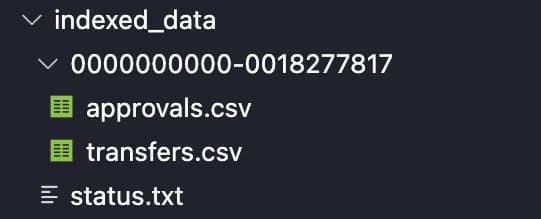
This will generate sub-folders under the ‘indexed_data’ directory, each containing CSV files with blockchain data. Should look something like this:
Conclusion:
In this tutorial, we’ve learned how to use Subsquid’s indexing framework to efficiently save processed blockchain data into local CSV files. Subsquid’s flexibility and power make it a valuable tool for blockchain data analysis and prototyping. If you have any feedback or suggestions, don’t hesitate to reach out to the Subsquid Team at the SquidDevs Telegram channel. Happy indexing! 😊
You can find the full project on this GitHub Repo
Reference: